



Table of Contents
Clean workflows depend on small IT decisions that show up in visible places: Microsoft 365 access, billing platforms, marketing approvals, real estate files, and client portals. Leaders need to decide whether daily IT ownership, project expertise, or both will keep work moving without overwhelming the business.
Dana Rodgers, Director of Systems Engineering at Orbis Solutions, notes: “The right IT model starts with workflow impact, who needs access, what must stay online, which data carries risk, and which decisions need executive approval.”
Cybersecurity now sits inside that decision. In a recent study, 60% of respondents said cybersecurity was the top challenge that led them to work with an MSP. Plain-English guidance turns that pressure into better control over uptime, risk, and executive decisions.
Managed Services Vs Professional Services For Everyday Business Operations
Ongoing IT support and project-based IT expertise solve different operational problems. Clear categories help leaders approve invoices, SOWs, and internal IT requests with fewer surprises.
-
Daily system reliability: 24/7 system monitoring, patch management, automated maintenance, and endpoint defense reduce avoidable downtime and recurring tickets that interrupt billing, sales, and client service.
-
Defined project outcomes: Professional services support specific initiatives such as Azure work, Microsoft 365 changes, network upgrades, compliance preparation, or office technology setup.
-
Cleaner accountability: SOWs clarify what is included, what success looks like, and how leadership evaluates cost against uptime, risk control, and milestones.
-
Better user experience: Helpdesk support, account access, software support, and ticket tracking help billing teams submit claims, real estate teams retrieve files, and marketing teams deliver proofs faster.
For a law firm, a locked account can delay a critical court filing or closing package, while an unverified backup puts sensitive case files at risk. Endpoint defense protects the workstations handling confidential legal records and privileged communications. Work keeps moving. That is the practical control we focus on as a boutique cybersecurity partner: less ‘Geek Speak,’ more clarity around the systems, users, and records that drive your business.
The distinction becomes valuable when service categories connect directly to business impact. Monitoring, patching, Microsoft 365 administration, and backup audits turn routine IT maintenance into stronger continuity.
Managed And Professional Services Support Client-Facing Workflows
IT service models shape how teams respond when a client asks for a contract, invoice, campaign proof, listing document, or claim update. That link matters, especially as professional and scientific services represent around 18% of impacted sectors in one recent analysis.
-
Faster client response cycles
Account access management, software support, and Microsoft 365 administration reduce delays in sending contracts, proofs, invoices, or case updates. A locked mailbox should not stall a closing package. -
Reduced approval friction
Stable systems and clear ticket tracking keep managers from chasing disconnected requests across email, chat, and vendor portals. -
Protected confidential information
Endpoint defense, user privilege reviews, backup audits, and cybersecurity monitoring help protect client files, payer data, and campaign assets under regulatory pressure. -
More predictable IT spend
Managed service agreements and SOW-based projects help leadership separate recurring support from initiatives such as Azure migrations, new location setups, or compliance work. -
Cleaner vendor coordination
Co-managed services and third-party assessments define roles when internal teams, software vendors, or outside consultants share responsibility.
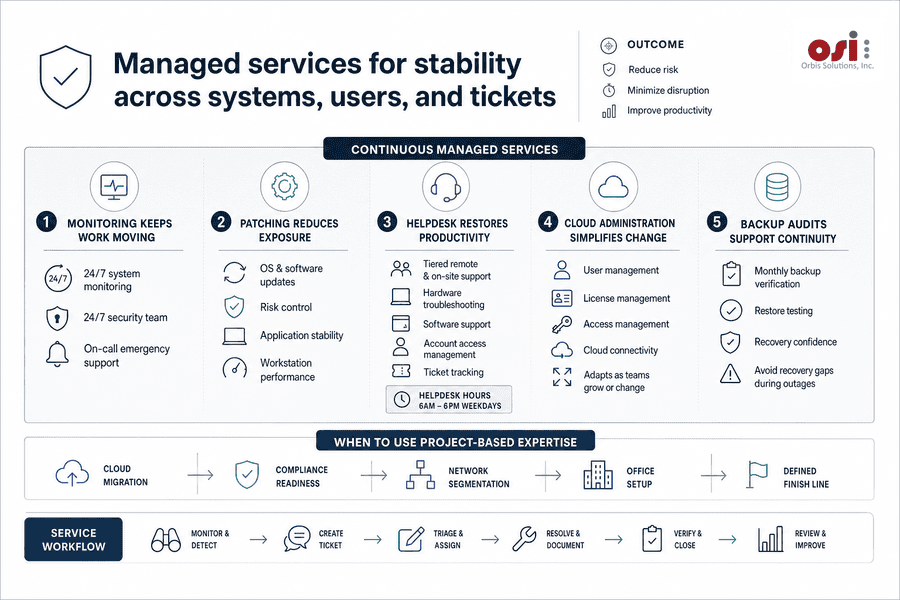
Managed Services For Stability Across Systems, Users, And Tickets
A user is locked out before invoices go out, a workstation needs a patch, Microsoft 365 licenses need adjustment, and a backup needs verification before leadership knows there is risk. Recurring IT work becomes valuable when it is tracked, maintained, and improved over time.
-
Monitoring keeps work moving: 24/7 system monitoring watches hardware and software health, while our 24/7 security team and on-call emergency support address urgent risk without implying round-the-clock helpdesk coverage.
-
Patching reduces exposure: OS and software updates support risk control, application stability, and workstation performance for users working inside billing, CRM, and document systems.
-
Helpdesk restores productivity: Tiered remote and on-site support, hardware troubleshooting, software support, account access management, and ticket tracking keep issues visible. Helpdesk support is available 6am to 6pm weekdays.
-
Cloud administration simplifies change: Microsoft 365 and Azure administration manage users, licenses, access, and cloud connectivity as teams grow or shift roles.
-
Backup audits support continuity: Monthly backup verification and testing help avoid discovering recovery gaps during an outage.
Project-based expertise enters when the change has a defined finish line. Cloud migration, compliance readiness, network segmentation, and office setup all need scope, approvals, and handoffs.
Explore Managed Services In Depth
Choose the Right IT Support Model
Clarify when managed services, professional services, or both fit your workflows. Orbis Solutions can help you map the next step.
Professional Services Support Projects, Compliance, And Strategic Change
Defined IT projects need scoped outcomes, owners, timelines, and acceptance criteria. When an executive approves a compliance initiative, AI rollout, vendor review, or infrastructure upgrade, the SOW becomes the map for decisions, evidence, and handoffs. Cyber risk is increasing rapidly for professional services firms—in Q1 2024 alone, the Identity Theft Resource Center reported 100 publicly disclosed breaches in the sector, more than double the prior year’s period.
-
Compliance preparation and evidence
We help organize technical evidence for frameworks such as FTC Safeguards, HIPAA, PCI-DSS, CCPA, NIST, CMMC, or NVGCB when they apply to the business. -
Security assessments and testing
Cyber risk assessments, vulnerability scanning, phishing simulations, annual penetration testing, and a free cybersecurity assessment help greatly reduce risk and prioritize remediation. -
Cloud and network changes
Azure, Microsoft 365 hardening, firewall and VPN management, network segmentation, secure Wi-Fi engineering, and cloud connectivity support safer growth. -
AI governance and automation
AI security assessments, AI adoption consulting, no-code workflow automation, and an AI security framework help improve workflows while controlling exposure. -
Vendor and supply chain review
Third-party assessments audit vendors for cyber risk and supply chain exposure before a vendor issue affects operations, customer data, or delivery timelines. -
Office technology setup
For a new location, we can disconnect and reconnect computer cables around a move, while the moving company handles the move itself.
Choose Between Managed Services And Project-Based Support With Business Dependency, Risk, And Capacity In View
Changing IT service models takes care because users, vendors, invoices, access rights, and leadership expectations are already in motion. The decision should follow business dependency, risk, and internal capacity.
-
Map recurring pain: Repeated tickets, access delays, patch gaps, backup concerns, and Microsoft 365 administration tasks belong in ongoing support when they affect daily work.
-
Separate one-time work: Azure projects, compliance readiness, network redesign, AI governance, vendor assessments, and office setup need SOW clarity.
-
Review internal capacity: Co-managed support helps internal IT teams scale during busy periods without losing visibility or ownership.
-
Clarify risk ownership: Assign responsibility for endpoint defense, user permissions, backup audits, phishing simulations, and incident response before an issue reaches customers or auditors.
-
Tie spend to outcomes: Connect invoices to uptime, faster ticket resolution, customer response speed, compliance readiness, and fewer workflow interruptions.
That review gives leadership a practical path from IT activity to measurable operating results.
|
Decision Area |
Best-Fit Support Model |
Operational Trigger |
Typical Owner or Handoff |
|---|---|---|---|
|
Microsoft 365 administration |
Ongoing service agreement |
New hire provisioning, shared mailbox changes, conditional access updates, and Teams permission requests occur every week |
Service desk handles execution; IT manager approves role-based access changes |
|
Azure environment modernization |
Defined project engagement |
Finance needs cost tagging, legacy servers require migration planning, or leadership requests a cloud readiness assessment |
Project lead owns scope, timeline, and SOW milestones; internal IT validates business requirements |
|
Cybersecurity operations |
Co-managed recurring support |
Endpoint alerts, phishing reports, MFA exceptions, and backup verification need consistent review without removing internal oversight |
Provider monitors and escalates; internal IT retains policy authority and incident communication |
|
Compliance preparation |
Project with follow-on support option |
A customer security questionnaire, insurance renewal, or audit request requires evidence collection and control gap documentation |
Compliance sponsor approves priorities; technical team supplies logs, policies, and remediation records |
|
Multi-location network changes |
Project engagement with documented handoff |
A new office, firewall replacement, ISP change, or wireless redesign requires planned cutover and rollback steps |
Network engineer delivers implementation plan; operations team receives diagrams, credentials, and support procedures |
Build An IT Model That Supports Growth
The right mix of ongoing support and scoped expertise improves uptime, protects data, cleans up workflows, and gives leadership better control over technology decisions. When Microsoft 365 access, client files, endpoint security, backup readiness, and project approvals work together, teams move faster with fewer interruptions.
Orbis Solutions serves as your boutique cybersecurity partner with plain-English guidance, proactive IT management, and strong security leadership. Contact us for a practical conversation about your current environment, support gaps, cybersecurity posture, or upcoming projects, including a free cybersecurity assessment if you want a clear starting point.